

Audience and style, part 2

Here’s Part 1

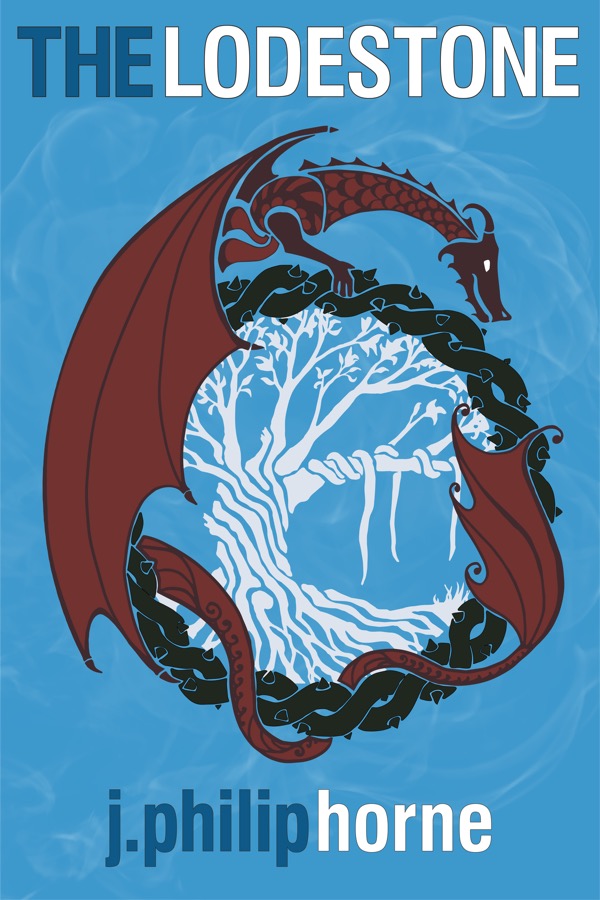
When I wrote The Lodestone, I not only had a story I wanted to tell, but also several aspirations regarding how I would tell the story. Here’s a list of some of my goals.

1) Strip it down to as few words as possible. My story kept trying to become 80k words or more. I worked to keep it under 60k.

2) Minimal voice-overs, thought-bubbles, and detailed exploration of emotions. Convey the inner life mostly by implication.

3) Constant motion forward with several points of no return.

4) Imply the backstory and let it be solved, not described.

5) If the protagonist doesn’t know what is going on or where he is, allow the reader to be left wondering as well. Confusion at key moments is okay.

6) Dialogue in bursts, not drawn out explanations or soliloquies.

Audience and style, part 1


My first attempt at a novel came at age 38. It followed the path of several popular epic fantasy authors with a strong single-character POV that rotated among a few different characters. It had lots of words. Here’s a brief example of the prose:

After a quick inventory of their weapons, Vaal and Teth set off into the oaken woods. Like ants marching through a mushroom patch, they walked beneath the huge trees in air shimmering green with stray shafts of sunlight breaking through the canopy. Teth was awed by the serene beauty of the ancient trees, which stood arm in arm through the marching centuries.

They walked, but did not talk. The trees had a weight to them that seemed to demand respectful silence. As the sun slid directly overhead, the air under the trees took on an emerald intensity that reminded Teth of swimming in the cold waters of the sea near the elven homestead. He walked on the seafloor, and the canopy above was the green ocean swell. His mind wandered, and dreams of his youth took him far away, where he knew nothing of the present.

Now, whether anyone else enjoys this passage, I like the imagery comparing the forest to the sea. I liked the overall story I was developing. I had a couple characters I loved, and the world-building was satisfying. The plot needed additional work, but I had a framework in place to carry the story forward.

Some 22k words into the novel, however, I abandoned it. I hope one day I can pick it up again, but I became convinced I was not writing a book that would captivate my kids, let alone anyone else’s kids. Too much descriptive text. A barrage of words and images that might go beyond their knowledge and experience. Now, as it turns out, I’ve since discovered that my kids are a tougher audience for my writing than other people’s kids, but I remain convinced my instincts were right.

So, who is my audience? Here’s how I defined my audience goal for The Lodestone:

Middle grade to younger YA and their parents. Twice.

I wanted to write a book that kids would love and that their parents would enjoy. Additionally, I wanted to reward reading the book a second time without making the first time through confusing. I’ll address how these goals specifically impact my writing in part 2. As to whether I succeeded or not is up to my readers.

LibraryThing Giveaway

LibraryThing I’m giving away a bunch of copies of The Lodestone on LibraryThing. If you are a member, swing by the Member Giveaways list and skim down it for the book if you’d like an opportunity to win it. Here’s the description of the giveaway.

Offered by JPhilipHorne (author): This eBook is available at Smashwords.com in multiple formats. Winners of the book receive a coupon for the free ebook download at Smashwords.com. Reviews of the book are requested at Amazon.com in exchange for getting the free copy. Available in multiple formats.

The giveaway ends on March 5, 2012.

Formatting your eBook, Part 3

More in this series: Part 1, Part 2

In Part 2, I described my basic workflow for publication to KDP. Step 1 of that workflow was “tweak formatting of Word doc.” In this installment I’m going to add some details regarding what tweaks actually help.

I should have written this installment first, as I fear I’ve forgotten some of the hoops I jumped through. Here are the ones I remember.

1) Everything (as in, each and every character in your Word doc) should be formatted using Styles. If you don’t know what that means, or you need to sharpen up your knowledge of how to use Styles, do so, but don’t try to fake this step.

2) The only exceptions to (1) should be at the individual character or word level, such as making a word bold in a paragraph. Keep these exceptions to a minimum.

3) Don’t ever use tabs, multiple spaces, multiple carriage returns or new lines, or any other means of manipulating the white space. All of that information should be in the styles. As an example, after a chapter header or some other type of non-normal paragraph, I used a style called NormalGap to add the extra white space. NormalGap was identical to NormalBase, the style I used for 99% of my text, except that it included 12pt spacing before it, thus following rule (1) and (3).

4) Base all your styles on the default Normal style. I’m not sure this is totally required, but I had significant problems with my paragraph indents on the first sentence until I started following this rule.

5) Don’t actually use the default Normal style. Create an identical style with a different name. Mine was NormalBase. No joke. This rule proved critical to getting a predictable output from Work -> Calibre -> KDP.

6) Sizing images is trial and error. The little curly images I used under each chapter header had to be much larger in Word than they appeared on the Kindle.

7) Add a chapter break before each new chapter. Do so via the paragraph settings in the Style, not as an inserted page break.

8) Minimize special fonts, margins, and other exceptions. Again, any such exceptions should be defined as a style based on the Normal style (or a style based on the Normal style). Don’t center a paragraph or change the margins via text formatting. Am I sounding repetitious?

9) Table of Contents get built as a separate file in the EPUB standard. MOBI puts it in the main book document. In part two of this series, I said “convert to MOBI (using some special settings)”. Some of those special settings were to point to the style I used for Chapter headers so Calibre could build an external TOC. However, you may still want a TOC in your book. Calibre gives an option to insert one at the very beginning or very end. I wanted mine right before chapter 1 but after the title page and dedication, so I had to build my own. Based on what I read elsewhere, I didn’t let Word build it for me. Instead, I added a bookmark at each chapter header and then add cross reference links to those chapters. This approach will not yield working chapter skips on the Kindle. The Calibre conversion with pointers to the Chapter style will create those skips. FYI.

10) No headers or footers. Default margins. No page numbers anywhere, just links (e.g. for the TOC). Etc.

Formatting your eBook, Part 2

More in this series: Part 1

In part 1, I listed my formatting goals, which were determined by a painful process of trial and error. Here’s a few of the problems I encountered along the way.

1) The cover image treated as a normal interior picture and given margins
2) More than one cover
3) Paragraph spacing normalized in the eBook (i.e. larger spaces between paragraphs ignored)
4) Next / Previous Chapter not working
5) Images sized weirdly (the only image I used was a little squiggle after each chapter header, and it was a pain)
6) Clickable table of contents not linked properly (actually, I headed this one off at the pass based on what I read from others’ experiences)
7) Page breaks at new chapters
8) Empty pages

There were more, but that gives an idea of what we are trying to overcome with our formatting goals. So, moving right along, let’s list out the tools of the (eBook) trade:

1) Microsoft Word

2) Calibre

That’s about it, unless you want to count the web browser used to upload files to KDP and Pubit! You’ve probably heard of Microsoft Word. Calibre is a free, open source ebook manager, and it happens to do a better job of creating MOBI files than any other tool I found. MOBI is the file type used by Kindles. When you upload your ebook to KDP and you want to know for sure how it is going to display, your best option is to do all the converting ahead of time and upload a MOBI file. Calibre will also convert your files to EPUB for Pubit! publication to Nook.

Here was my work flow to publish to Amazon’s KDP (a nearly identical workflow can be used with Pubit! and the Nook)

1) tweak formatting of Word doc.

2) save word doc as filtered HTML

3) import HTML into Calibre

4) convert to MOBI (using some special settings)

5) tell Calibre to email the MOBI file to my Kindle

6) evaluate book on Kindle

7) repeat 1 – 6 as needed

8) upload finished MOBI to Amazon and publish

In the next installment in the series, we’ll discuss the specifics of formatting a Word document for ebook publication.

Formatting your eBook, Part 1

More in this series: Part 2

After I wrote The Lodestone, I started working on three things:

1) Proofing / editing

2) the cover

3) formatting for Kindle

I take that back. First I started soliciting agents. Then I moved on to the three items above. Item one was easy (for me). My wonderful mom has served as a professional proof reader for a major publisher, and she volunteered to help me out. Item two (the cover) is for another post.

On to item three: formatting my manuscript for Kindle Direct Publishing (and Pubit! for the Nook, and ultimately print publication with Createspace). This is going to take more than one post, but you probably already knew that given the title of the post.

In this first post I’d like to discuss the formatting goals that I had. Before I list them, however, let me make one thing clear. There is a lot of input out there on how to format ebooks. Go ahead and look around. Do a few searches online. I’m confident you’ll agree with me. Strangely, though, I had a bear of a time getting the formatting to work. The ecosystem is still in its infancy, and the various tools leave much to be desired.

My formatting goals were:

  • A cover image that didn’t have unnecessary margins but went edge to edge on the screen.
  • An indent at the start of paragraphs.
  • Consistent, predictable line spacing for chapter titles and paragraph breaks that needed a gap (e.g. when the scene was changing mid-chapter).
  • A linked table of contents in the body of the book prior to chapter 1
  • Navigation links that worked (e.g. the Kindle’s “Go to…” with the options of Cover, Beginning, TOC).
  • A well-sized chapter image (just a little squiggle underneath the “Chapter 1″).
  • Page breaks that worked before the title page, dedication, TOC, each chapter, etc.
  • Secondary text formatting that was preserved (in my case, this was a second font used for emails a character was reading)
  • Chapter breaks that were navigable (so you can go forward a page at a time or a chapter at a time on the Kindle)


I ultimately achieved all of these goals with one exception. To get the navigable chapters, I lost the “Go to… Beginning” link. Why I had to make this trade-off… I’m still a little mystified, but when it was all said and done my chapters were navigable but the Beginning link points to the Title page instead of Chapter 1.

What I’m skipping is the incredible effort it took to figure out that these were the problems I had to solve. It was very hard to find a comprehensive list of what I was even trying to achieve as I formatted the book.

In future installments, I’ll discuss the tools I used and some of the hoops I jumped through to get it to all come together.

How I wrote The Lodestone

I wrote The Lodestone in the middle of a full life: husband, father to four, (very) full-time job. Here’s how I did it.

First, I had some specific ideas on the questions I wanted to answer before I started writing. I thought the book Plot & Structure was helpful in putting together specific goals: three acts with two doorways, the LOCK, the hero’s journey, etc. But that was pretty much it.

Next, I headed to a Starbucks after dropping my daughter off at a church youth group event, a pen and pad of paper in hand, along with Evernote on my laptop. Thirty six days later I completed the first draft at just under 60k words.

I’m not going to lie. It was an intense 36 days.

Brainstorming

Sitting in the coffee shop with a blank piece of paper, I started jotting down rhyming couplets. I have no idea why this worked, but it kicked my imagination into gear. Then I pulled open Evernote and began writing and rewriting book blurbs for this novel I had decided I wanted to write. Within an hour I had in mind a few key ideas and a couple of main characters. Then I brainstormed the climactic scene, and came up with an outline for the final confrontation, the showdown, the payoff. I put all these ideas into an Evernote entry.

The next day I spent my commute to and from work (I have a long one) hammering out ideas and taking voice notes in Evernote. That evening, I cracked open my entry from the previous evening and got the very beginning of the book outlined. Day three I started writing.

The Daily Pattern

I primarily used Word to actually write the book and Evernote to keep track of my ideas. On my commute each day, I put on some music and talked to myself, working through where the story was and the next 5,000 to 8,000 words. I was always driving toward a predetermined ending, but each day would see my pseudo-outline of what happened along the way morph and change. Over lunch at work I’d generally log my thoughts in Evernote and then frantically type out a few hundred words of the story. At home that evening I’d repeat.

My Evernote files were two-fold: a journal-like log with a date followed by bulleted notes (reverse chronological); and a timeline (the story timeline, not my writing timeline). Each day I tried to add to the journal notes on three topics: what needed to be written next, what problems I needed to solve to keep writing the next couple days, and any thoughts I had on how I wanted to map out the remaining word-count to get me to the final scene at around 55k to 60k words. Then, as I actually wrote the chapters, I documented the highlights in the timeline along with any critical information pertaining to my world-building or character development.

I generally wrote six days a week. The first couple weeks were far less productive as I was consumed with extensive world-building, note-taking, back story-developing, etc. By the final three weeks, though, I was writing well over 2000 words on days I wrote. Over the 36 days, I averaged over 1600 words a day, including days off.


So that’s what I did, but the actual experience was far more intense. I was totally consumed. I had trouble sleeping. All non-essential household tasks were put off. I felt like my brain was on fire. In the final week I was writing close to 2400 words a day with the desperate desire to finish before we took a planned family vacation, because I knew I wouldn’t be able to rest otherwise. I type pretty fast, but I struggled with mangled sentences as my brain raced ahead of my fingers. It was madness.

I finished with 8 days to spare. The vacation was terrific.

The Lodestone, now available on Amazon

The Lodestone is now available on Amazon for purchase on the Kindle! Check it out!

It has been quite an adventure getting the book ready for publication. I’ll describe the process I used to format the manuscript and convert it to MOBI in another post.

A big THANK YOU to Ruth H. for the excellent proof reading and Jamison B. for the editorial feedback.

Next up, I start working on formatting it for the Nook. Once that is done, I’ll evaluate using Createspace to offer a print version.

Of course, I also need to write the second book in the series as well. Stop back here for occasional updates.

The Way Forward

A couple months ago, I concluded that the publishing industry is at a tipping point. I was in the midst of querying agents, yet I found myself ambivalent about the whole process. I have no beef with agents, and believe they are and will remain valuable partners for authors. However, the big publishers have not yet adapted well to the shift toward digital, and I did not want to sign with an agent only to find myself limited to contractual terms that were dissatisfying with a publisher.

The reality was I may have never gotten an offer of representation…

In the initial two dozed queries I sent, a very prominent agent at a prominent agency requested a full. My wife and I decided that we would take the traditional route if that agent wanted to represent me. Otherwise, I’d go forward on my own in the digital market.

A week ago, I received a polite rejection. Digital, here I come.

Is the future now?

“Since April 1, Amazon has sold 105 Kindle books for every 100 print books sold. The company has sold more than three times as many Kindle books so far this year as it did at the same time a year ago.”

So says a Wall Street Journal blog post. The article mentions Amazon’s big competitors are also growing, with a total market of almost a billion dollars in 2010.

We are at a tipping point, one that surprised most folks. Not that it happened, but that it happened so fast. Jeff Bezos, Amazon’s CEO, has stated surprise that it took Kindle only four years to outpace Amazon’s amazing print book business.

I’ve got a manuscript, and I’ve shopped it with some agents. I’ve got a full sample out to an agent right now who would be phenomenal to work with if he likes what he reads. It feels good to try my hand at the publishing game, and see a few glimmers of hope.

But the more I read, the more I think the world has tipped, and the print publishers no longer present the best option for many authors. First off, let’s deal with, “but how will anyone ever hear about the book?” Good question, and one I’ve considered as well.

The ugly truth is that the big publishers don’t market their mid-list books anymore. I’ve seen reference to this simple fact over and over. Google it. See for yourself. “publisher mid-list marketing“. Ouch.

The other issue is the insane contracts for digital editions that follow the precedent of the print editions. The digital editions end up overpriced, with very little money going to the author due to ridiculous royalty structures and depressed sales volume.

The world is in motion, and we are tipping away from all that paper that comes at too high of a cost — obsolete contractual terms, poor marketing, ever more limited distribution channel, etc. Where is all this going? Fodder for another post. Hint: most of this has to do with authors and publishers. Agents, in my opinion, have the opportunity to play on both sides of the see-saw.

For now, my wife and I have agreed we’ll see what happens with the current submission under review. As I said, it is a big deal agency, so no need to be hasty. However, I’ve stopped sending out query letters, and have a version of my manuscript formatted for the Kindle.